
Main Page Navigation
Site Content
Content on this site is divided into “Christian Related Content” and “Site Related Help Content”.
To view:
- Christian Related Content click on “Clark’s Anchored in Christ logo” located in top left corner of the header.
- Site Related Help Content click on the “Help” menu option located in the top right corner of the header.
The corresponding “Main Page” of which ever content is selected will appear.
The Main / Category Page
The Main / Category Page is designed as the “front door” for which ever content you wish to explore. There is a Main / Category Page for Christian Related Content and there is a Main / Category Page for Site Related Help Content. The Main / Category Page provides users with:
- A Comprehensive Overview: It displays all categories and articles in an organized manner (A Category-focused layout), allowing users to understand the breadth of topics covered at a single glance.
- An Integrated Search Bar: It serves as the primary location for the search box, which is the most common way users find specific information quickly.
- Dynamic Content: Unlike a static article page, the Main Page includes dynamic blocks like Popular Articles, Recently Updated Articles, or New Articles, which guide users to the most relevant or timely content.
- A Modular layout that includes FAQs, resource links, and action boxes, creating a full-service support portal as opposed just displaying an article.
- A Central Navigation Hub to locate and select articles to view
Navigating the Main / Category Page
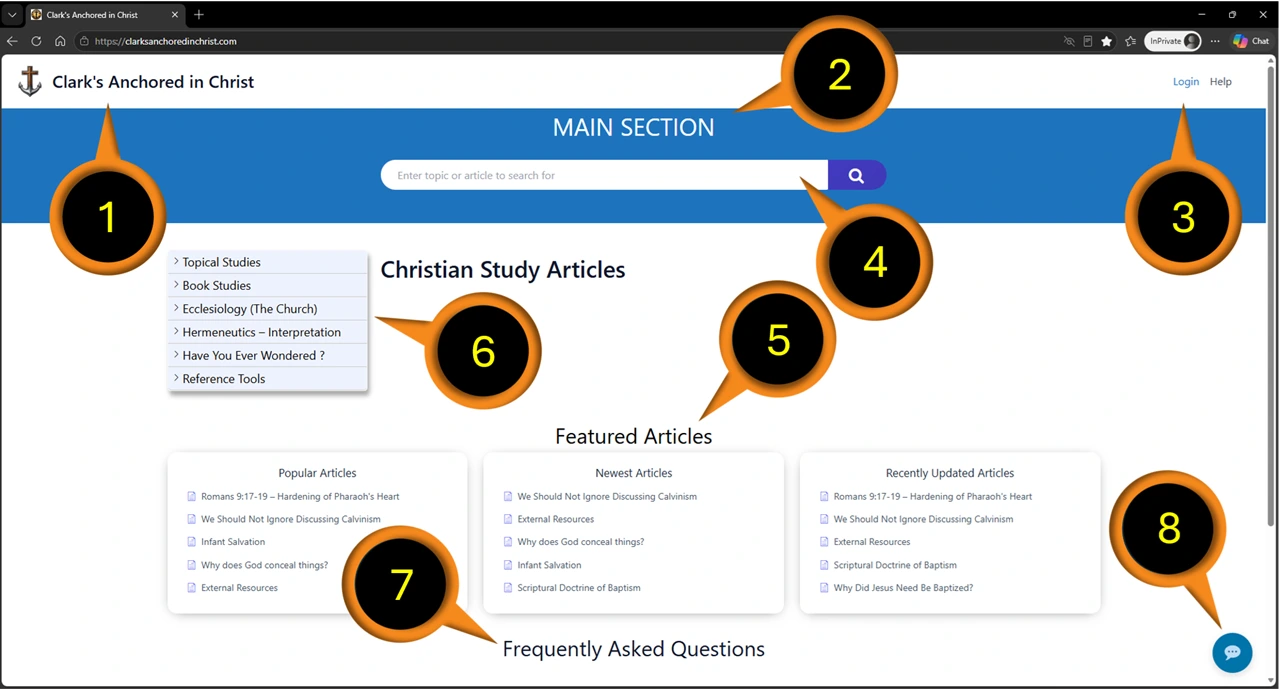
- Click on Clark’s Anchored in Christ logo to display Home Page
- Location Indicator: Main Section (Categories Page)
- Menu Options
- Non-Registered User Menu = Login and Help
- Registered User Menu = Login, Account and Help
- Category and Article Search Bar
- Featured Articles:
- Popular Articles
- Newest Articles
- Recently Updated Articles
- Collapsible Category Tree / Sidebar Menu
- Frequently Asked Questions
- AI Assistant
Clark’s Anchored in Christ logo
The Clark’s Anchored in Christ logo also serves as a Home button. Clicking on the logo will return you to the Main / Category Page of Christian Related Content.
Location Indicator
Serves to indicate which page – the Main / Category Page or the Article Page – as well as which content the user is viewing.
Menu Options
Non-Registered users will have the option to select “Login” + “Help” from the menu. Non-Registered users have access to all Categories and Articles but do not have the ability to leave comments. If a Non-Registered user wishes to become a Registered user then they can click on “Login” and then select “Register”.
Registered users (if logged in) will have the option to select “Account” + “Login / Logout” + “Help” from the menu. Registered users can use the Account menu to view or change their profile and or change their password.
The above Menu Options are available regardless of which content or page the user is viewing
Basic Search Bar
The Main / Category Page provides users a “Basic Search Bar” tool in which they can use to search for specific categories, sub-categories and or articles. can type what they are looking for into the Search Bar and hit enter. The Search will look for Categories, Articles and words within the an article that match and return a maximum of 5 matches. If the user cannot see what they are looking for they can try being more specific.
- Search Scope: Primarily searches through article titles of the selected content.
- Functionality: Provides standard results based on direct matches within the Content being searched.
- User Interface: Displays results after the user submits their query or navigates to a results / articles page.
- AI Search Refinement: At the bottom of Search results the user will have the option to “Ask AI” to refine their search.
NOTE: AI results are specific to this site.
Featured Articles
As part of the comprehensive overview, modular layout and category-focused layout, the Main / Category Page dynamically displays the Top 5 Most Popular Articles, The last 5 recently updated articles and the last 5 newest articles posted.
Sidebar – Collapsible Navigation Tree
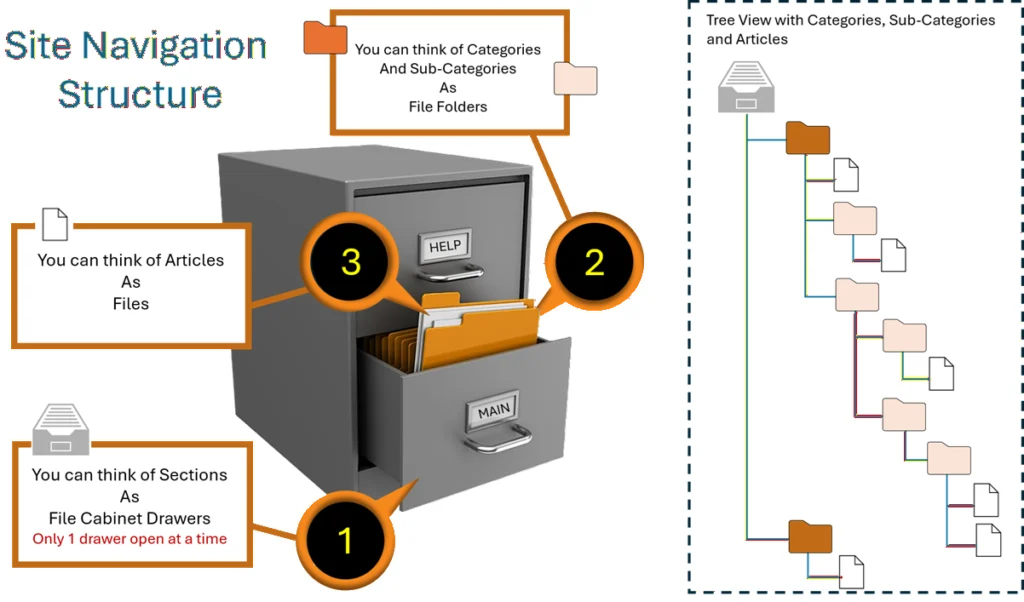
The Sidebar offers users a collapsible / accordion-style navigation tree, in which they can drill down through the various categories and sub-categories to find articles. Some articles may be appear under two or more categories depending on its relevance to each Category. I have tried include a natural hierarchy while at the same time displaying some of the more popular categories at the top level of the collapsed navigation tree. While that may change, the tree will still function well for those used to this kind of drill-down navigation. For those unfamiliar please see the next image.
Frequently Asked Questions
Also known by its acronym FAQ’s. Currently there is only one FAQ and that is about how to be saved. It may not be the most frequently asked question but it will permanently remain as the first FAQ on any given Main Page and for the benefit of those who yet do not know the answer. It is my hope that in time – if this site takes off – that I will post another 4 of what are the most popular / relevant questions being asked.
AI Assistant
Thanks to Google’s generous free tier use of their AI engine, I am able to provide users with AI assistance, the ability to ask questions regarding content related to this site. Under the free-tier plan I am allotted limited usage per day. However, I will be monitoring its usage and again, if warranted I may very well look into a plan that offers more availability.
This AI agent utilizes natural language understanding (intent-based search)
Unlike traditional search tools that rely on exact keyword matches, AI interprets the intent behind a user’s natural language question. This allows it to surface relevant content even when the user doesn’t know the specific terminology, improving the discoverability of niche or complex information.
It provides content-aware responses
AI can be trained directly on your existing WordPress posts, pages, FAQs, and Knowledge Base articles. This ensures the answers it provides are context-specific and tailored to your unique documentation, rather than being generic AI responses.
It uses on-site multi-source integration
AI can synthesize information from multiple sources—such as PDFs, articles, and custom post types—to provide a unified answer. An AI Advanced Search can run multiple prompts in parallel to present a comprehensive overview, including summaries, related questions, and glossary terms.
WARNING ON USE OF AI
I cannot guarantee the accuracy of the answers to every question a user may ask. It should however provide site resources in which it formed it answers and these resources should be confirmed. Likewise, just as I ask each person to test everything they read on this site to the word of God, so too should everything that AI provides as an answer to your questions equally be tested to God’s word.
You have a responsibility to take an active role in your faith, so be like a Berean and joyfully listen to others, test everything -without exception – to God’s word and remember to share with others in hopes that they may do the same.